Saturday, June 21, 2014

"Six Sigma on a Budget" book review with simplified tools

One of the biggest issues with companies deploying Six Sigma is the upfront cost for training. For a company of 1000 employees, most consultants would recommend 10 Black Belts and 100 Green Belts. Although it can be an effective way to gain critical mass, the price tag can scare many companies away.

There are many ways to cost effectively implement Six Sigma, without all the upfront costs. In fact, we prefer a more targeted approach to process improvement, not a mass training that cannot possibly be supported or managed properly.

Based on these issues with Six Sigma deployment, I was intrigued by the book "Six Sigma on a Budget: Achieving More with Less Using the Principles of Six Sigma"


Despite the title, this book is not about how to deploy Six Sigma cost effectively. We utilize an approach where we identify a target area, focus on making that area successful, then roll out to the rest of the areas in a methodical manner. Please contact us for help with this approach.

Instead, the book focuses on how to use the Six Sigma tools more effectively, to increase utilization with employees and reduce training time. The author, Warren Brussee, went through Six Sigma training at GE, but felt there was a better way to train, without as much technical details, with an approach that provides a more effective use of the tools.

The book covers the basic concepts of Six Sigma, and says that you only need high school level math and Excel software to achieve Green Belt level skills from this book.

Brussee presents many different simplified versions of existing tools, to show how to easily utilize the concepts, without the complexity and effort.

Here are the tools he presents as "Simplified," along with a description on how it differs from the traditional application:

  • Quality Function Deployment (QFD)
    • Only uses the two comparisons between customer needs and design options (items). The design items are grouped to help determine priorities. Each customer need is ranked with a 1 to 5 scale (5 being safety or critical), and each design item is ranked with a 1 to 5 scale (5 being that it addresses the customer need completely). The design option that ranks the highest is the best approach for the team. This reminds me of a Cause and Effect Matrix.
  • Failure Mode and Effects Analysis (FMEA)
    • Only lists the concerns (risks) on the left side column, and lists the potential solutions across the top, using a similar scale as QFD.
  • Process Flow Diagrams (PFD)
    • Uses only a few symbols, and only displays four process types: assembly, transfer, measurements, quality judgments
  • Correlation Tests
    • Instead of running correlation statistical tests (generating a correlation coefficient), he suggests using visual charts to stack different factors on top of each other, using the same timeline on the x-axis. If you can visually see how variation aligns with other factors, then there might be a correlation. I've seen these simplified charts in Excel, called sparklines. Learn more about sparklines >>>
  • Gauge Verification
    • Suggests using "master" parts that are centered near the target (middle of the specifications), then having 3 different operators/machines measure the master part 7 times each. This will provide 21 measurements, of which repeatability and reproducibility can be calculated.
  • Control Charts
    • Uses a simpler chart to identify issues that is more intuitive and understandable to workers. Instead of plotting a single data point, a vertical bar is plotted showing the average of the last 11 readings, and the spread represents the variation of the 11 readings. The bars are colored coded based on whether they exceed control or tolerance limits.
  • Design of Experiments (DOE)
    • He discusses using a 2-level factorial DOE with 5 replicates (i.e. a 2 factor experiment would require 2^2 x 5 = 20 samples), and to compare the average and standard deviation results to each combination, to find the settings that have minimal variation, and that is closest to the nominal results.

Overall, I would recommend this book if you are looking for "simplified" ways to teach and utilize the tools listed above (QFD, FMEA, PFD, Gage R&R, SPC, DOE).

To order the book or read the first chapter, visit the Amazon page for "Six Sigma on a Budget" >>>

Monday, May 26, 2014

List of supplies for Lean Six Sigma Event Facilitators

If you are just getting started leading or facilitating lean or six sigma events, you need to be prepared with a list of kit supplies to have during the event.

Each event will have different objectives and require different supplies, but here is a list of items to consider (Note: Amazon affiliate links):

Write On - Cling On Reuseable Static Easel Pad - Better for the environment than paper easel pads, but if you want paper, at least use the recycled paper version, and you might need a easel pad stand.


Post-it Recycled Sticky Notes - A must have for any event. Select the recycled paper version.


Digital Stopwatch - If you are doing anything related to time, you need real measurements from the process, not data from a system. Timings also allow you to see the waste first hand.


Clipboard with calculator - Useful for taking notes, and doing quick math, such as takt time, yield, or DPMO.


"Butcher" paper roll - Good for taping to wall for process mapping with post-it notes


Recycled Perforated Note Pads - Good for taking notes during walk throughs, tours and process reviews


Colored pencils - Useful for showing multiple flows on spaghetti diagrams


Flip chart markers - Write on dry erase boards or easel pads


Name tents - These are reusable with dry erase markers, to save paper.


Other items that you will need, but should not require ordering online:
  • Scissors
  • Rulers
  • Tape (masking and scotch)
  • Pencils and pens
  • Digital camera - someone should have a smart phone that takes good pictures
  • Tape measure
  • Glue sticks
  • Sharpies (permanent markers) - bold enough so words are legible when posted on the wall
The following items are not required, but you might find them helpful:


Pedometer - Easy way to capture actual walking distance of people, instead of what it should be on paper


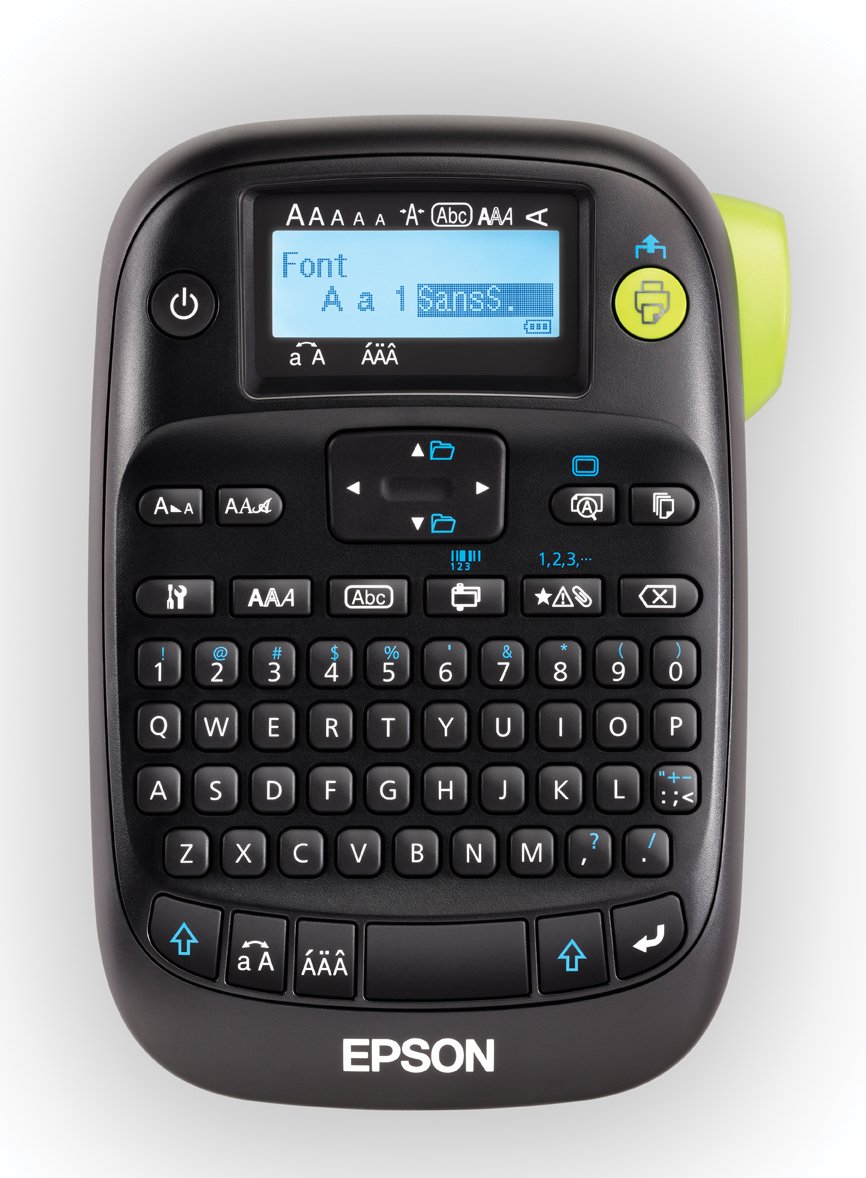
Label maker - For making signs and labels in work area


Laminator - For making signs to hang in work area or metric sheets that can be wiped clean each day


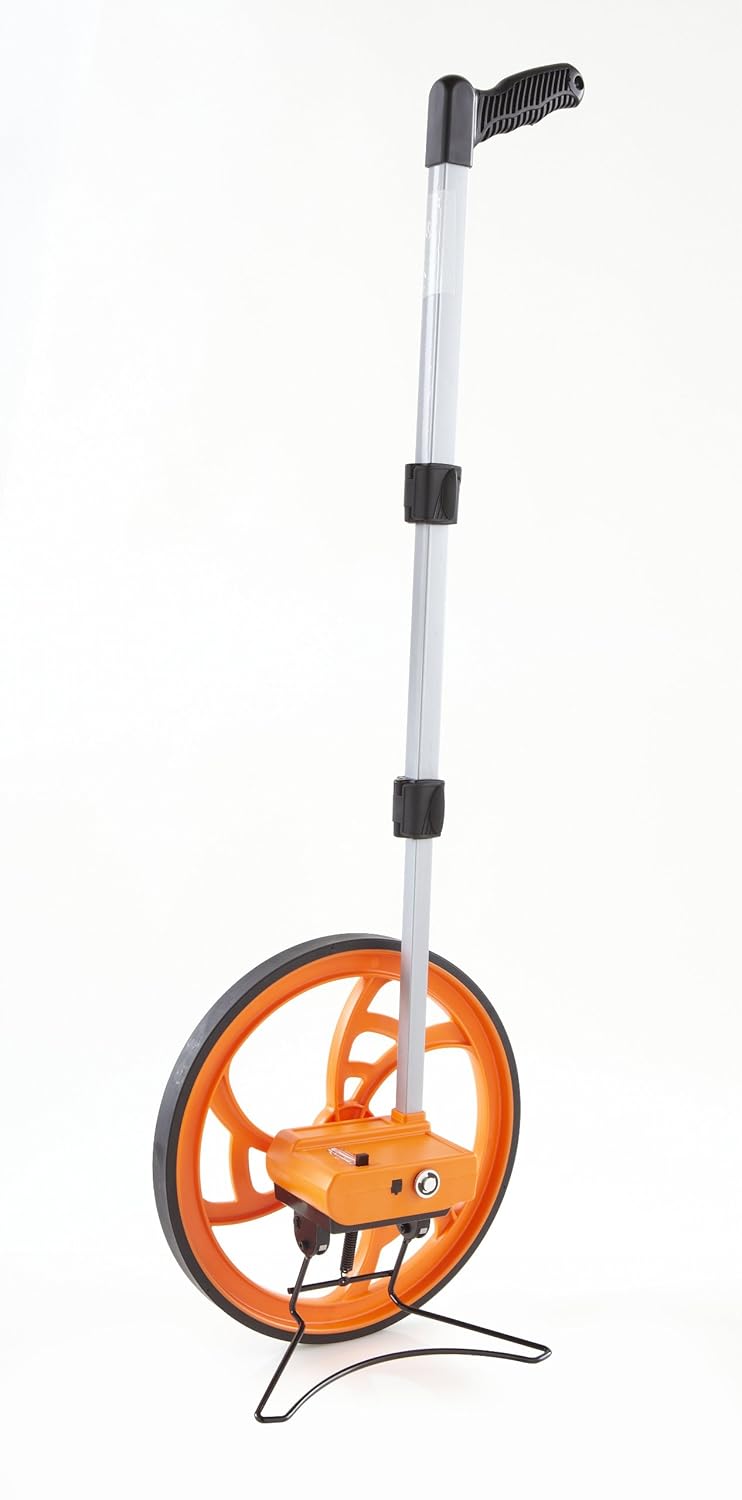
Measuring wheel - An easier way to calculate square footage and distance than a tape measure


These items above are generic for most events, not specific to a VSM or 5S event, which would require additional items, such as VSM data box sheets or 5S red tags.

Did we forget something important off the list? If so, leave a comment below...

Thursday, May 8, 2014

6 resources for Six Sigma Black Belts to save time and improve effectiveness

Sigma Black Belts and Master Black Belts often have too much on their plate, especially when there aren't many other Black Belts in your organization.

Here are some resources that you can use to be more efficient and effective, giving you more time to spend coaching and mentoring your Green and Black Belts.

  1. Project Tracking System - Free web-based DMAIC project tracking system, with email reminders for overdue milestones and actions, and upload required artifacts and documents with each phase. This will help you keep projects on track and increase the chance of success.
  2. Green Belt Exam Reminder System - Free reminders sent to Green and Black Belts planning to take the ASQ exam. The emails will provide tips, tricks, materials, and expected progress for key dates and milestones leading up to the ASQ exam, so you don't have to remember to stay in touch with your mentees and make sure they are staying on track.
  3. Lean Six Sigma News - Stay up to date on the latest Lean and Six Sigma trends, tips and tricks. Top blogs, articles, tweets and posts from the top experts and consultants across the web, all displayed on one webpage with no effort.
  4. Lean Six Sigma Skills Assessment - Use this assessment tool to provide your mentees with a way to evaluate their skills and experience on a 1-10 rating scale, based on four major categories: Lean, Six Sigma, DfSS and Soft Skills.
  5. Training Material Powerpoint Templates - Download powerpoint training templates to avoid wasting time creating training material from scratch. Simply add your company logo, review the slide notes, and you're ready to teach topics such as: DFSS, Control Charts, Capability Analysis, 5S, Lean Six Sigma, Cost of Poor Quality, and Root Cause Analysis.
  6. Facilitation Tools - Order items to help you facilitate lean events, such as resusable dry erase sheets, post-it notes, clipboards, VSM data box templates, and more.

Here are some new resources we are working on this year:

Training Reminder System - For each class you teach, setup a checklist to send email reminders as your training class progresses towards the date of the class. Tasks such as:

  • Check attendance list/sign ups (2 weeks prior)
  • Print training materials (1 week prior)
  • Send reminder email and attachments to attendees (2 days prior)
  • Send contact information to attendees (1 day after)
  • Send survey to attendees (2 days after)
UPDATE 7/5/14: The class reminder system is now up and running! Check it out at LeanSixSigmaProjects.com >>>
Cause and Effect Prioritization Matrix - Project hopper tool to prioritize projects based on customized criteria and ranking scores, to help determine the best Green and Black Belt projects to work on.

If you are interested in the new tools, sign up for our mailing list to get notified when they are released. If you have other resources you need to make your job easier or more effective, post your ideas below in the comments.

Saturday, May 3, 2014

15 last minute tips before taking an ASQ Green or Black Belt exam

You've been studying for the ASQ Green or Black Belt exam. You think you're ready, but you're nervous that you overlooked something, or will make a mistake that prevents you from getting certified. Here are some last minute tips to consider, to put your mind at ease. Many of these tips can be used for any exam, but we're targeting those taking an ASQ exam.

If the exam date is months away, or you're just considering the exam, we have provided some tips and reference material for those taking the Green Belt exam on our website at: http://biz-pi.com/certification.asp

If you've decided to take the exam, check out our newly launched "ASQ Six Sigma Exam Reminder System," which provides you with timely updates in your inbox leading up to the exam date. Learn more at: http://biz-pi.com/exam_reminders.asp

The exam is coming up soon. Am I overlooking or forgetting something?

Here are the last minute tips I tell people a couple days before the test.

1) Know your reference material
Don't forget your reference materials and books. You can bring as many items as you want, but if you bring more than 3 things, you have too many. Definitely bring your Primer booklet, however any sample questions and answers from the practice exam must be removed. For reference books (see list of recommended Green and Black Belt books), you should have post-it notes or colored flags to mark and label important sections (see image at left), so you don't waste time searching for the answers.

2) Bring the correct supplies
Bring at least two pencils with good erasers and plenty of lead, and a calculator you are familiar with that has newer batteries. You will be provided with scratch paper that you will need to turn in when you're done, so you don't need to bring paper.

3) Pace yourself
Bring a watch or cell phone, so that you can properly pace yourself, so you don't lose track of time. Here is the takt time for both tests, which is how much time you have to complete each test. You should check after every 30-60 minutes where you are at to make sure you are ahead of schedule.

Green Belt: 144 seconds per question (2:20)
  • 100-question, 4-hours
  • 240 minutes / 100 questions
  • 2.4 minutes per question, or 2:20 or 144 seconds
Black Belt: 96 seconds per question (1:36)
  • 150-question, 4-hours
  • 240 minutes / 150 questions
  • 1.6 minutes per question, or 1:36, or 96 seconds

So you need to be quicker than you were with the Green Belt exam, in addition to the tougher questions. If you don't know what takt time is, review the section on Lean. 

4) Stay positive
If you think you are going to pass, you will be more relaxed and more likely to succeed. Maintain a positive attitude even when you're struggling, and try to stay relaxed. If you start to feel nervous take a few deep breaths to relax, or stretch for a few seconds.

5) Start with the easy questions
Don't stay on a problem that you are stuck on, especially when time is a factor. Since it is multiple choice, if you run low on time, you can always guess at the hard ones. All questions are equally weighted, so the easy questions are worth the same as the hard ones. If you skip a question, put a star or mark it so you can quickly find it (both on the question booklet and the answer sheet).

6) Take your time 
Pace yourself, don't rush. Read the entire question and pay attention to exactly what they are asking for, which might not be what you read the first time. The exam will have questions that seem tricky or worded in a way that may be confusing. Don't skim it or make assumptions about what the question might be asking.

7) Focus on you
Don't worry if others finish before you. Focus on the test in front of you, and how you are doing. Use the full time allotted if possible, to increase your chance of getting the best score possible, as exams are ranked based on complexity/difficulty. Learn more at: http://asq.org/cert/faq/exam-grading-process-detailed

8) Inspect your work
If you have time left when you are finished, look over your test answers. Make sure that you have answered all the questions, since there is no penalty for guessing. Watch out for careless mistakes (misaligned answers with the question number, especially if you skip questions). Ensure that you fully fill in the ovals so you get proper credit, and fully erase answers you decide to change.
9) Eliminate poor answers
Since the exam is multiple-choice questions, the process of elimination can help you choose the correct answer. Start by crossing off the answers that couldn't be right. Then spend your time focusing on the possible correct choices before selecting your answer. I prefer to cross out the ones I eliminate, so it's more visual.

10) Breaks may be worth the time
Take a break during the test if you need it. A five minute break may seem costly, but it can refresh your mind, and help you break from a stressful situation. Even standing up and doing a quick stretch can be enough to get your mind back on track.
11) Get to bed early
This seems obvious, but many people try to get as much studying in the night before, and it can do more harm than good. Your brain and body need sleep to function well, so don't stay up late!  In fact, go to bed earlier than you normally do, as you may be nervous or have trouble falling asleep, so the extra time might come in handy. Cramming is not helpful for these exams, since memorization is not important.

12) Know your exam location
Do you know where the exam is taking place? If you have never been there before, go visit the location so you know how long it takes to get there. This includes finding the actual exam room, not just the building. The exam date is not the time to get lost or take the wrong road.
13) Eat a good breakfast
Don't skip breakfast the morning of the test. Hunger can cause distractions, and drain your energy. Consider bringing something to eat like power bars, candy, snacks and/or something to drink.
14) Arrive early
Get there early to allow for unforeseen problems (accidents, construction, car issues, etc) that can stress you out or make you late. This will also give you time to review your notes right before the test, so your brain is ready to go.

15) Set multiple alarms
The last thing you want is to oversleep and stress out getting there, or worse, arrive late and not have time to finish. Set multiple alarms, and have someone else make sure you are up by a certain time. This is a significant and important test, so take every precaution you can.
 Hope these tips are helpful to you. Did we forget some tips that you feel are important? If so, leave a comment below. Good luck!!

Saturday, April 19, 2014

Adding comments that move with the data in Excel SPC control charts

When you first start out implementing Statistical Process Control (SPC), it is unlikely that your company will invest in a powerful software package. Most likely you will start out using paper and pencil method or Excel, because there is no external payments required to get started (labor only).

You can manually create columns in Excel to calculate the control limits for your chart, since Excel can quickly provide a line chart. To help you avoid creating the control limits and chart yourself, you can download a simple Excel file of an Individual Control Chart for free >>>

One of the biggest limitations to using Excel is the ability to identify out of control points. I don't have any great solutions for this unfortunately. This is why a software package like SigmaXL is ideal, which is an inexpensive Excel add-in (under $300). The work around to this limitation is to train your employees on the Western Electric or Nelson rules, and provide a handouts for them to reference (somewhere near the location of the control charts for quick access). Even with lots of training, out of control conditions will be missed or incorrectly identified.

The next limitation is the ability to mark the out of control condition with a comment about the assignable cause or corrective action (also known as OCAP or out of control action plan). Until recently, I would make a comment in Excel by inserting a text box into the chart. However, as you add more data points to your chart, the text comment does not move with the out of control point. You have to manually move it, which is a pain, and probably won't be properly maintained.


There is a solution to this problem! 

First, we need to isolate the data point you want to assign the comment. Click on the data point in the Excel chart, which will highlight all the chart data points.


Next, click on the same data point a second time, to isolate only that data point. Otherwise, the changes will be applied to all points (which we don't want).


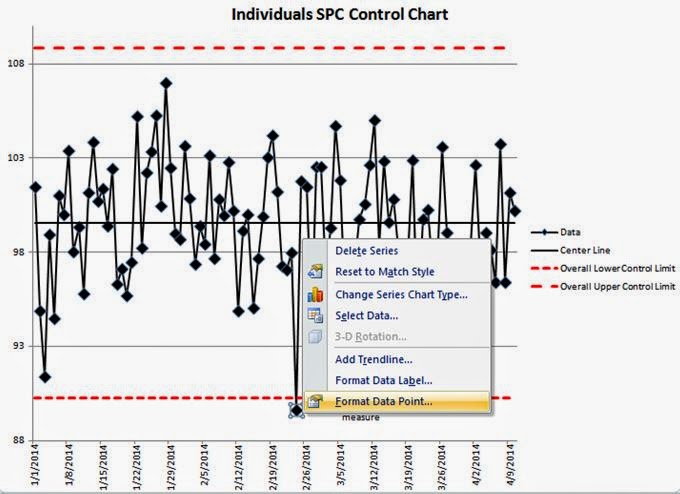
Next, right click on the isolated data point. You should see the following menus appear. 


Next, select the "Add Data Label" command.  

This will assign the actual data value to your data point. Click on the data value to edit the value, and write in your comment. 


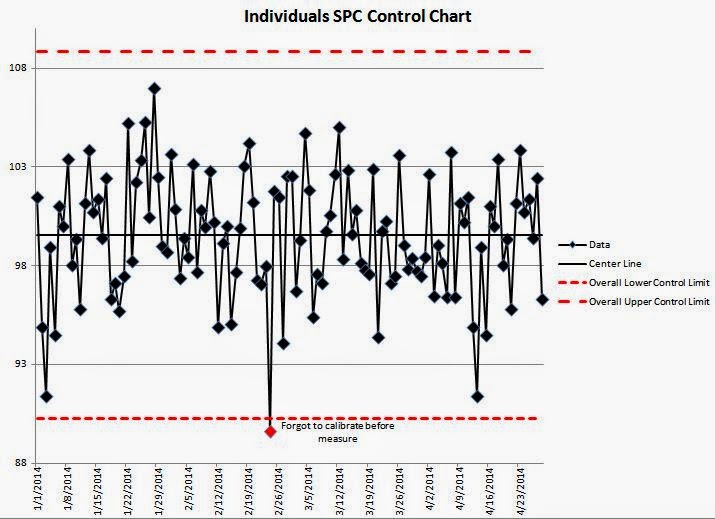
We entered "Forgot to calibrate before measure" as the new data label. This will keep your comment aligned with your data point, even when new data points are added. In the chart below, we have added 20 more data points, but the comment stays connected with the out of control point. Problem solved!


I would also recommend changing the data point color of the out of control condition (as shown above), so it stands out, and you can show others that it was identified. 

Simply right click on the isolated data point (make sure it is the only point highlighted).


Next, select "Format Data Point..." then click on the "Marker Fill" section


Select "Solid Fill" and then select the color of the data point. Red is a commonly used color for out of control points.


As a reminder, here is the link to this free simple Individuals control chart template for download >>>

If you would like to train your employees on Statistical Process Control (SPC) Charts, purchase our training Powerpoint template >>>

Have you found any other tips for control charts in Excel?

Monday, April 14, 2014

How to increase the number of graphs you can display in Minitab beyond 100

With an increasing amount of data being collected and analyzed these days, I often run into the restriction in Minitab that you can only have 100 charts displaying in the project file at any given time.

There is a way to change it in the Options settings.

Go to Tools --> Options


In the Options section, select Graphics --> Graph Management


In the field called “Maximum number of graphs:” at the very top, change it from 100 to whatever number you need, such as 250 or 500. I would suggest only the number of variables in your data set, so you don’t use up too much memory or storage space in your file, as it will take longer to save and open in the future.

This number will be saved as the default setting for Minitab going forward, so you don’t need to change it every time.

There are other options for dealing with graphs that you can change on this page. I would leave the default settings until you become more familiar with Minitab and know what changes you are making.

Do you have any other Minitab tips you'd like to share?

Thursday, February 13, 2014

What if you can't find a Green Belt project for certification?

When promoting Six Sigma certification, we rarely have difficulty getting people interested in the idea. With opportunities to increase your salary $4000 to $7000, get promoted, improve your problem solving skills, and boost your resume or C.V., most are willing to put in the hard work to obtain a certification, especially at the Green Belt level.

The biggest problem we run into is helping people find a project to work on.

"Do I have to do a project, can't I just take the training and take a test?"

Projects are important to allow you to get an opportunity for hands-on experience applying what you have learned in the training. The real world is much different than the textbook examples, so it's important to learn how to take the concepts and figure out how they fit into your company, job function, and industry. This also provides you with an opportunity to explain these concepts and ideas to your co-workers and management, who may know nothing about Six Sigma. This also helps the learning process when you have to explain it or teach it to someone else.

 six sigma shift explanation


In addition, the training you receive will not make complete sense until you are analyzing your own data that you are very familiar with. This allows you to compare your current approach to analysis against the training, to see how the analysis confirms or conflicts with your initial interpretation. That is where true learning takes place.

To help you brainstorm some ideas for defining a project, we put together a few example projects we found online. Most training classes show manufacturing examples, but the majority of the opportunity in the world is outside manufacturing (service processes). It can be difficult to figure out how to select a service related project, so these examples should give you a few ideas.

Hopefully you see the value in doing a project along with the training.

"But I can't find a project to work on"

What if you can't get support for a project from your current company? Is that fair that you are stuck with no options? You want to learn the tools to help you with your day-to-day problem solving, and enhance your chance for promotion, but if your company won't give you the time, direction or support for a project, now what?

There is a Green Belt certification option through Lean Sigma Corporation that does not require a project. Instead of a project, you complete 17 modules, go through examples and exercises using Minitab or SigmaXL, take interactive quizzes, and complete tests at the end of each phase. You also need to get a score of 80% or higher on the final exam (150 questions over 2.5 hours) in order to become certified.

The certification is recognized globally, and covers the body of knowledge from both ASQ and IASSC. It is accredited by The Council for Six Sigma CertificationThey also have an option to have a Master Black Belt mentor and guide you through the training and your project (if you choose to have one), reviewing each phase and your artifacts, to make sure you're ready to move on, and understanding the tools and concepts correctly.

A demo of the online training system is also available on their website


We still feel that a real project is the best way to go to get the most out of your learning experience. Even though the online certification program does not require a project, you should still try to get one defined and completed, so you have some true improvements to show your employer (or future employer). However, we know that isn't always possible, especially if your company does not support your training and certification. It can be a catch-22 if your company doesn't give you the time or support to take training and get certified. You might feel stuck, in that you want to be able to do more process improvement projects in your future job, but you can't get hired into a position to do that without a certification. The online Green Belt certification option can help address this dilemma, and get you moving in the right direction.

Let's summarize the information in this article:

1) Green Belt certification is an excellent skill set to have. Find general information about Six Sigma certification

2) Training is highly recommended along with an improvement project. See examples of projects


3) If you can't get a project, but want to move forward with a project, check out the online Green Belt certification. At your earliest opportunity, apply your new skills to an actual project.


If you don't like this option, we also compiled a list of other Green Belt certifications that might meet your needs, budget or schedule.

Good luck! The journey is challenging but the majority of people find it rewarding and they were glad they went through it.