Showing posts with label quality. Show all posts

Wednesday, December 12, 2012

Online statistics training from Minitab has great animation and examples

Minitab statistical software is one of the most powerful and popular programs around, especially for those in the Six Sigma realm.

They recently released a suite of online training courses called Minitab Quality Trainer.


The training is very good, much better than what can be done by an instructor in a classroom. That is because the words have been streamlined, and the animation enhances the concepts being discussed. Online training can reduce the training time by 50% or more compared to traditional classroom training. Minitab has a lot of experience teaching these concepts, so it's no surprise. You can view a sample of Quality Trainer on their website.


There are nine chapters, covering the following topics:


Chapter 1: Descriptive Statistics and Graphical Analysis (60 mins)
Chapter 2: Statistical Inference (60 mins)
Chapter 3: Hypothesis Tests and Confidence Intervals (180 mins)
Chapter 4: Control Charts (75 mins)
Chapter 5: Process Capability (100 mins)
Chapter 6: Analysis of Variance (ANOVA) (60 mins)
Chapter 7: Correlation and Regression (60 mins)
Chapter 8: Measurement Systems Analysis (150 mins)
Chapter 9: Design of Experiments (120 mins)


One of the issues with their training is that there aren't any estimated times for each chapter. We like to solve problems, so we took the time to breakdown the chapters and sections, to give you and your employees a better idea how to schedule and plan for the training courses (see above). Completing all nine chapters takes about 15 hours, with some chapters as short as 50 minutes, while others are as long as 3 hours. For a detailed breakdown of each chapter section, download the estimated times here (.XLSX file).

The cost is also very reasonable. For an individual, they can have access to the training for only $30 per month (or $300 per year). If you have a network version of Minitab at your company, you can also add unlimited access to Quality Trainer for only a couple hundred dollars per licensed user.


To learn more about Minitab Quality Trainer, visit their website at http://www.minitab.com/en-US/products/quality-trainer/default.aspx

Thursday, July 26, 2012

Problem solving is critical for any business

Does your company have a problem solving process, like PDCA or 8-D?

If so, do people use it? How do you know?

Simple, ask for documentation. If an employee or improvement team is really working on a problem, and they aren't writing down or documenting what you're doing, then how well are they following the process? If the process is "in their head" then it's either a really simple problem, or they're probably missing some steps.

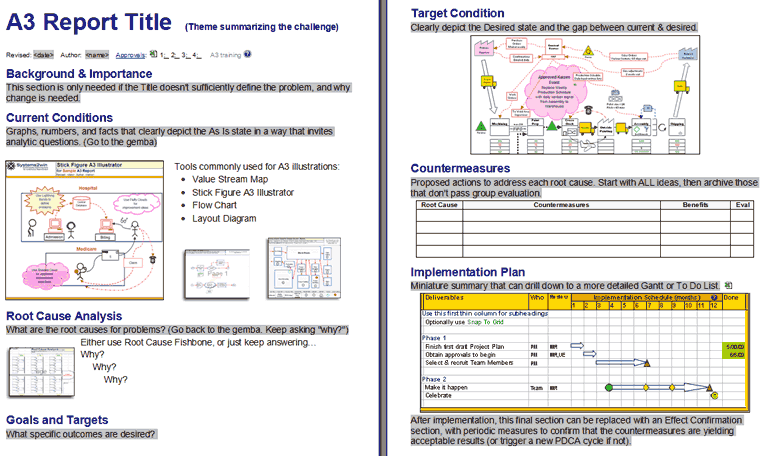
Example A3 Report
Here are some simple questions you can ask people in your company, to see if they are following the process and structure, if they can't provide documentation to prove it. 

What is the problem you are trying to solve?


Many teams cannot clearly articulate the problem, so they will struggle solving the problem if it is not well defined. This step can take a long time to complete, depending on the complexity of the problem. Teams often skip through this step quickly, so they can get to root cause right away and have some answers from management. Encourage them to take their time and make sure the problem statement is clear before moving on.

What step of the problem solving process are you in?


This will help you understand whether your employees are following the process or not, and help you understand how far along they are with this problem/issue. If they struggle answering the question, they may not be very knowledgeable about the process, or jumping around steps and working out of order. 

What data did you use to determine the root cause?


This will help you understand how well the root cause was investigated. If little to no data was used, then the solution will have much less chance of being successful, so the odds that they are actually addressing the right cause is slim to none. I find that teams that give up on collecting data and skip ahead to solutions are also less likely to adhere to the problem solving process.

Is your solution addressing the long term?


Many solutions address the immediate need, or contain the problem in the short term only, but they do not complete the entire 8-step process to prevent the problem from recurring. This happens often because after containment is in place, management stops asking about the issue, so the teams get pulled into the next "fire" instead of completing the problem solving process on the issue. This will be evident when you ask about different problems they've worked on, but they can't explain what actions were taken to prevent the problem from coming back. If the problem hasn't recurred, but no improvements were made, then don't be surprised when it does come back as next month's "fire".

There are many other questions you can ask, but these will give you a pretty good indication.

Finally, don't just ask the quality organization about problem solving around product failures. These departments may have contractual reasons to follow the process, as it probably gets submitted to the customer. Instead, talk to your HR department, your shipping department, Invoicing department, and even your Lean/Six Sigma organization (yes, we don't even follow our own recommendations all the time for our own issues). Problem solving is a company-wide process that everyone should be using on their top problems.

Tuesday, July 24, 2012

We don't need any help, we are already lean!

"Lean and Six Sigma are only for manufacturing organizations!"
"Our processes/company is unique, so that won't work here!"
"We're already lean because we're working so hard and so many hours!'

What "lean" looks like to people who don't get it yet.

Have you heard these comments before? That's the first sign of a company in desperate need of process improvement. 

I'll admit, there is some difficulty in getting people in a transactional or office environment to embrace lean and six sigma concepts. The biggest issue is that they can't SEE their workflow, so they cannot easily translate a manufacturing example (often used in training materials) to their own jobs.

I'll also admit, I can lean out anyone else's process, but when I decided I needed to lean out my own work, I ran into some difficulties.

After some serious evaluation of what I actually do (when not training or consulting, those are easy), I realized that I provide "items" to my customers. Items could be book summaries, templates, training material, procedures, guidelines, reference material, examples, recommendations, graphics, just to name a few. My clients take these items, and turn them into action, which should result in an increase in value or reduction in waste or reduction in life cycle costs to their business. Therefore, I indirectly help my clients improve their processes, or directly help them (when they get stuck).

I figured out I used a very simple process to convert a request from a client into an "item".

1. Obtain needs from clients
2. Gain approval to proceed (based on cost and time frame)
3. Create draft of item
4. Review draft with colleagues/experts
5. Make revisions
6. Review revision with broader audience and client
7. Make 2nd revision
8. Release item to client
9. Follow-up with client to determine usage
10. Review success and modify process

For example, one client asked for a summary powerpoint document of basic lean tools, that they could give to their employees, to let them read through prior to a lean event. We had some of it created already, but not in one single presentation, so it needed some work.

Here is what I did:

Step 1. Discussed how many slides, what kind of detail they wanted, which tools and concepts to include, how to navigate between slides, etc.
Step 2. I came back with how long it would take, and how much it would cost. We agreed to proceed after some discussion. I also provided some sample slides, and a basic framework for the presentation.
Step 3. I created a rough draft of the training. It's easy to get 80% done, then want to start something new (get sick of working on the same thing), but this is where you need to step it up to reach 100% completion.
Step 4. I next sent it to my consultant friends and former co-workers for feedback. Some provided better slides, challenged the intent of the presentation, and gave me some ideas on what to improve.
Step 5. I made most of the revisions, and ignored those that were minor, but would add significant time.
Step 6. I next sent it out to the client and some non-expert friends, to see if they could follow along with the presentation. They would better represent my target audience.
Step 7. After getting some of their feedback, I made some final changes.
Step 8. I sent the final "item" to the client for approval, and an invoice was provided.
Step 9. After the training, I asked for feedback on how it was received, and what additional changes to make.
Step 10. If I got hung up in the process, or missed a requirement, or the item didn't get used very much, I determined what I should do better next time.

Bottom line, until you actually reach step 8 above (release product to client), you have not provided any value to your clients. You don't get "credit" or get paid until you deliver. This is my "production", which connects me back to the training material that was too "manufacturing" focused before. If you can show this connection to clients, you'll see their eyes widen, and they will start thinking of all kinds of ways to apply lean to their processes.

What I want my office to look like...
Now, in order to apply lean to this particular process, I need to gather data on the following:

1) How long does it take from step 2 to step 8 (cycle time)?
2) How many items do I complete per month (output/deliveries)?
3) How well did the item get received or used (quality)? If it was good training, I would expect it to be reused over and over again. If they never touched it again, maybe it was considered low quality. Did I have to revise the item after releasing to the client? On a 1-10 scale, how happy was the client with the item?
4) Did I complete the item when they wanted it (on-time delivery)?

Once I have this data, then I can start to apply lean and six sigma concepts to the process. Create a whiteboard and display these metrics near your desk. Include a status board for the items you are currently working on, along with a visual of which step in the process each item is located. 

When reviewing the data, if it took longer than I planned, I need to look at my other activities, to see how they impacted it. The more items I'm working on at once (work in process), the longer it will take me to deliver to my client. This has really kept me focused on working on one or two items at a time (single piece flow). I like to jump around and "multitask" but I know that slows down my process, and it takes me longer to pick up where I left off. Once I start step 2, I need to stay committed to reaching step 8, so I can minimize the time between customer request to delivery to customer without any errors. This is the heart of lean.

Quality can be a little difficult to measure in the office. I mentioned some approaches above. When I go to step 9, and look at how often my items are being used, I feel this is a true measure of how good the item is. If I send out a well-written book review, but no one reads it, then did I actually provide value that the client could take and convert into improvements to their business? If not, then I didn't succeed in my task. If I create a template, and it gets sent around the company, and 50+ employees use the template, then I feel like that item was higher quality than the book review.

In summary, making the connection between lean and the office environment can be difficult and you should expect to get push back when discussing it. However, you can practice learning how to apply lean to the office by reviewing this article, and looking at the work you currently do today. It will be easier to convince others how lean directly relates to them when you can give specific examples on how you apply it to your own work. What has worked well for you when dealing with office processes?

Wednesday, January 6, 2010

Don't "check the box" with soft improvement tools

We recently were reminded of a problem that comes up every so often in regards to process improvement tools. The "check the box" mentality.

You train, teach and mentor individuals on which tools to use, and when they finally decide to use the right tool at the right time, they try to shortcut the process just to get it completed, missing the entire purpose of the tool!

Let's use the fishbone diagram. Our clients will identify the need for a fishbone or maybe we'll have to suggest it. Instead of gaining the benefits of the team discussion and brainstorming, someone sits down at their desk and starts to fill out the diagram.

"I worked on that last night, and finished it, then emailed it to everyone. Now which tool do we need to do next?"

Process Improvement tools, like fishbone diagrams, are not the end result. The purpose of the tool is to provide a framework in order for the process of evaluation to take place. When we perform a fishbone diagram, we are actually doing many different things without realizing it:

1) we gather up the right resources from cross-functional areas
2) we clearly define the problem statement (often overlooked)
3) we openly talk about problems and variables that cause the problem we are trying to solve
4) we brainstorm why it could be happening (without fear or insults) using commonly used categories (Man, Method, Material, Machine, etc)
5) we generate a very thorough list of potential variables to go investigate

The REAL output of a fishbone diagram comes down to two main things:

1) a plan to go investigate some of the most likely variables
2) an opportunity to interact with a diverse group of stakeholders in the problem, get to know them, and see their unique perspectives and hear how that problem impacts them

Notice we didn't mention a nice looking fishbone diagram with a fish outline around it, with color-coded labels for each category.

Even if NOTHING is done after the fishbone diagram meeting, there still was value in creating the fishbone. Most likely, you will have actions that come out of the effort, but don't overlook the PROCESS that took place to create it, which is where much of the value came from.

We use the fishbone diagram as an example, but it applies to many of the tools, especially ones we consider "soft" (little to no data analysis involved).

The inspiration for this article came from a group we worked with that was trying to quickly complete a Current State Value Stream Map (VSM) because they were running out of time before the scheduled Future State Mapping event. This event had a hard date due to individuals who were flying in from out of town. The team was suggesting that they could quickly draft the Current state map on their own, then have the actual owners of the proceses review it right before the next event, then jump into developing the Future State.

We politely reiterated that the completion of the current state map is not the end result. It is the PROCESS of developing the current state map where the value is created. The most important part is the time spent with a concurrent group of people defining the process, talking about the issues, understanding that the process is broken, and hopefully building relationships with these other stakeholders. Those relationships are really the key to the VSM. Now when future issues come up, they can be avoided or better anticipated, since the perspective of others are now better understood, and they can include or discuss the impact with them BEFORE a change or issue occurs.

For example, during the VSM, you might discover that leaving off the account number on a form causes 10 minutes of work for a later process run by Judy, who was at the event. After the event, you run into an account number that looks unfamiliar. You call Judy and discuss, and she recommends you return the form to the owner before processing it. You've saved yourself time processing it, and cut the wait time from when you completed the form, until she would find the error, and have also given instant feedback to the form originator that there was an error. You also saved Judy time reviewing the document to find the error. Obviously, you would want to permanently resolve this issue. However, this probably was not even a major issue that came out of the event, yet the benefits are already being seen because of the VSM event. If you and Judy had not gone through the VSM process, you would have never been able to anticipate those kinds of issues.

Spending time in an event will also give people a chance to think clearly about how they do work. It will also allow them time to digest the fact that the process is indeed broken, and that they will have to change the process in order to make it better, especially if their process is the one causing the most problems. If you speed through this process, you'll miss the entire change management process, and you won't have the commitment you need going forward.

We also see people get wrapped up over the format of the template. On an FMEA, they argue over the title of a column (Key Product Characteristic or Critical to Quality), or whether the Severity ranking is a 6 or a 7. The FMEA creates a nice spreadsheet for prioritizing the effort, but the value lies in the concurrent discussion between all stakeholders. After the event, the individuals in the event are much more likely to think differently, and talk directly to each other about other issues they encounter, than they were before the event. The FMEA was just a process developed that forced this group collaboration to take place.

In a perfect world, all processes would be linked together where this communication and discussion was happening constantly between all stakeholders, but we know that's not realistic. Companies get siloed away from each other via departments and budgets and physical locations. These soft tools are necessary to bring thsse groups back together, even if for just a day or two.

The tools that are more about the process, rather than the actual end result include: FMEAs, 5 Whys, Affinity Diagrams, Force Field Analysis, Process Flow Diagrams, Value Stream Maps, and Fishbone (Cause and Effect) Diagrams. This doesn't really apply to the "hard" analysis tools like control charts, histograms, statistical analysis, etc. Those can be performed by an individual without a team, as long as the results are shared and digested as a team.

Bottom line: The process improvement tool is not usually the end result. The process to get there is where most of the value is created and discovered, so don't try and shortcut the process just to "check the box".

Saturday, November 21, 2009

New spin (literally) on an old quality tool

I love the Pareto chart. It's one of the simplest quality tools, yet one of the most powerful, and underused tools out there. It's so easy to get buried down into an issue, and forget that it's not the one that should be focused on.

However, when I recently presented a Pareto chart to a Senior VP of an organization we are working with, I noticed everyone in the room had tilted their head to the side, in order to read what each category said underneath each bar.


It quickly occurred to me that anytime you present a Pareto chart with more than a couple words per category, you should flip your Pareto chart on its side, so that the categories are easily legible, and you don't give your customer a sore neck (since you're already a pain in their neck as it is!)


Have any other helpful tips? Let us know...